
Anima Color - Paint by Number
Candy MobileBoard
4.63.68K Reviews
- Version
- 2.0.1
- Installs
- 1.00M
- Age Rating
- Everyone
Screenshots

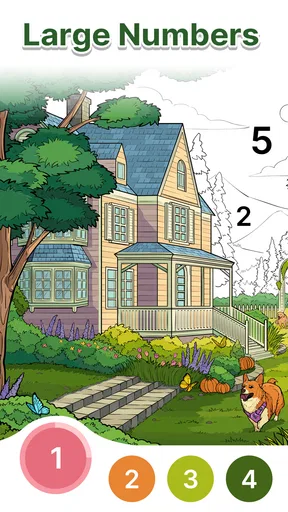
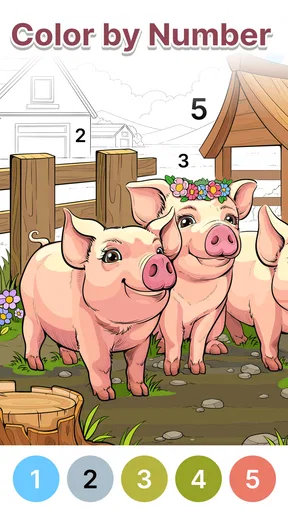
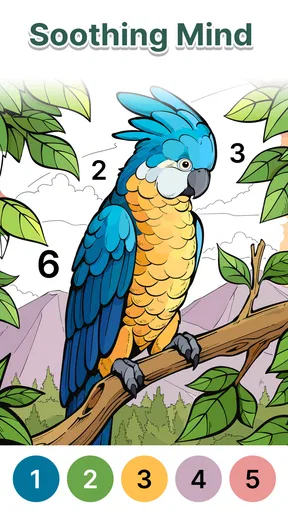

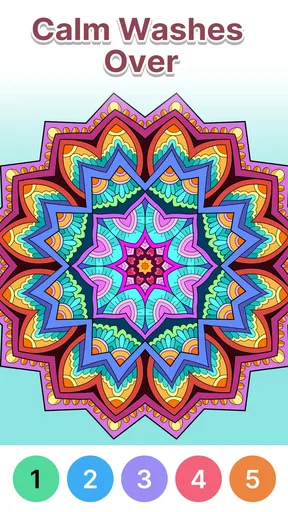
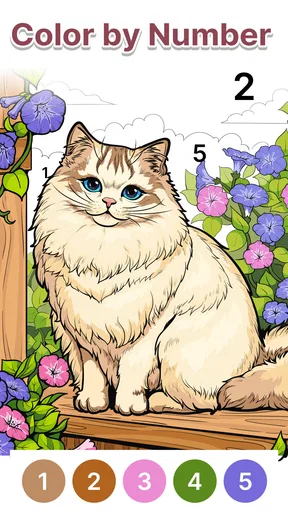
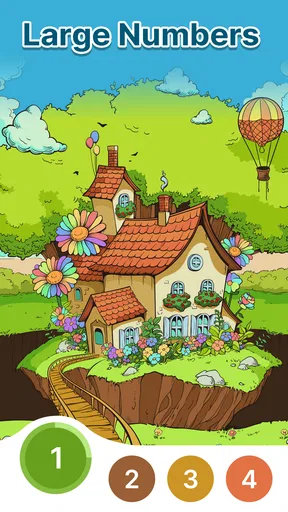
Our Review of Anima Color - Paint by Number
 Analysis by Appyee
I opened Anima Color - Paint by Number expecting a simple board game with a coloring theme, and that is exactly where its appeal begins. It does not ask me to learn complicated rules, compete against another player, or build a long-term strategy. Instead, I choose a picture, tap numbered areas, and watch the image gradually become complete. That straightforward action makes it easy to start during a quiet break, while the steady visual progress gives me a reason to continue for a few more minutes.
Created by Candy Mobile, this free board game is aimed at Everyone and runs on Android devices using version 6.0 or later. Its store short description is “Anima Color,” while the longer presentation points toward large-number coloring designed for older users and relaxation. In practice, I found that the experience can suit many adults, not only seniors, especially anyone who prefers calm, low-pressure play over fast reactions.
How the coloring loop feels from the first tap to the finished picture
I focus here on the small decisions that make each picture easier to finish: how I scan for a number, choose a manageable patch, and keep the board from feeling visually busy. A useful habit is to pause when the next target is hard to spot rather than tapping around at random; that keeps the activity calm and helps me notice what is actually slowing me down. Next, I look at the checks worth making before a session.
The first action is deliberately easy
The first thing I do is select an available coloring image and look for an area marked with a number. I then choose the matching color and tap the section. There is no complicated opening tutorial to memorize and no demanding setup before the board becomes interactive. The game communicates its basic idea through the picture itself: find a numbered space, match it with the color, and fill it.
That simplicity is important for the intended mood. A more traditional board game usually asks me to think about turns, opponents, positioning, or resource management. Here, the board is more like a quiet visual task. I can begin without preparing a strategy, and I can stop without feeling that I have abandoned a team or ruined someone else’s match.
The numbered areas also give the activity a small sense of discovery. At first, the illustration may look incomplete and slightly confusing, particularly when several tiny sections sit close together. As I identify the right number, the next action becomes obvious. I am not simply tapping randomly; I am scanning the image, matching information, and making a small decision before each stroke.
For older players or anyone with less patience for dense interfaces, this low entry barrier is one of the strongest parts of the design. The game’s purpose is understandable almost immediately. I do not need to study a rulebook, create a complicated plan, or remember a sequence of moves. That makes it suitable for a short first session with a family member who wants something more engaging than passive scrolling.
There is also a useful distinction between easy access and effortless completion. Starting is simple, but some areas can still require careful attention. Small numbered spaces may be harder to identify when the illustration contains many details. I found that the best approach is to slow down rather than tap quickly. This is a coloring activity, so treating it like an action game works against its main strength.
The feedback rhythm keeps the board readable
Every correct tap gives me immediate visual feedback: another section changes from unfinished to colored. That response is modest, but it is exactly what makes the loop satisfying. I act, see a visible improvement, and then have a clearer picture to inspect. The board gradually moves from a collection of blank fragments toward a recognizable illustration.
This rhythm is more important than it may seem. In a conventional puzzle, the reward may arrive only after I solve the whole challenge. Here, the game breaks progress into many small confirmations. Even when I have only a few minutes, I can complete several sections and feel that the session produced something tangible.
The numbered system also reduces the frustration that can come from choosing a color. I am not asked to decide whether a sky should be pale blue or deep blue, or whether a flower needs a warmer shade. The board gives me a defined target. That structure is helpful when I want to relax rather than make creative decisions.
At the same time, this is not a replacement for a full digital painting app. I cannot approach it as an open canvas where I freely mix colors, draw outlines, or change the composition. The satisfaction comes from accurate completion, not artistic control. That trade-off will matter to anyone comparing it with a blank coloring app or a drawing tool.
I noticed that the feedback works best when I keep my attention on one color at a time. Instead of hunting for every number in sequence, I can focus on the currently selected shade and fill the visible matching sections. This creates a tidy workflow: select a number, scan the picture, complete the matching areas, and then move to the next one. It reduces visual clutter and makes larger images feel more manageable.
Another practical habit is to work from obvious, larger regions toward the smaller details. Large areas reveal the picture’s structure early, which makes the remaining fragments easier to interpret. When I begin with tiny sections, I spend more time searching and may lose the relaxing pace. The game does not require this method, but it makes the experience smoother.
The reward is visual completion rather than competition
The main reward arrives when the image looks finished. I get the pleasure of seeing a dull or fragmented board become a complete colored scene. That transformation is the reason the game feels closer to a relaxing hobby than a conventional competitive board title.
I like that the reward does not depend on beating another person. There is no pressure to be faster than a friend or to protect a winning position. My progress belongs entirely to the current picture. If I make a mistake, the consequence feels limited to correcting my selection rather than losing an entire match.
This makes the game a good fit for quiet routines. I can use it while waiting for an appointment, winding down before bed, or taking a break from work that requires sustained concentration. A realistic use case would be a short evening session after household tasks: I finish a few numbered areas, notice the image taking shape, and stop when I feel ready. The activity gives my attention somewhere gentle to rest without demanding a large time commitment.
For seniors, the large-number focus can be particularly useful because the task is organized around recognition and repetition. However, the practical experience still depends on screen size, eyesight, and comfort with touch controls. Someone who struggles to distinguish small sections may find a crowded image tiring. In that situation, a simpler coloring option with larger shapes could be a better choice.
The reward also has a quiet psychological advantage: it is visible. Many mobile games award points, coins, or progress bars that disappear into an abstract system. Here, the picture itself records the work. I can look at the board and immediately understand what I accomplished. That direct connection between action and result is more satisfying to me than a number increasing without a visible change.
Still, players who need a strong sense of novelty may find the reward limited. The central pleasure is repeated completion, not surprise mechanics or a developing story. If I am looking for character upgrades, multiplayer tension, or increasingly complex strategic decisions, this board game will feel too restrained. It is better understood as a calming activity with game-like structure.
Resetting a session feels natural, but repetition is part of the deal
When I finish a picture, the immediate task is over and the experience naturally resets around another image. That reset is important because it prevents a completed board from becoming a dead end. The same basic actions remain available: choose a picture, identify the numbered spaces, apply the matching colors, and watch the result develop.
This creates a dependable session pattern. I can complete one image and stop, or begin another when I want the same kind of low-pressure focus. There is no need to preserve a complicated state in my head between sessions. Returning later feels easy because the core interaction is familiar from the first tap.
The downside is that the reset does not transform the game into something fundamentally different. The appeal depends on enjoying the coloring process itself. If I already feel bored after matching numbers for one picture, starting another will not suddenly add strategic depth. This is the clearest reason some players should skip it: the game’s strength is consistency, and consistency can feel repetitive if I need constant variation.
I also think the reset works better when I set a small personal stopping point. Rather than treating every available image as something I must finish, I can decide to color one section or work for a short while. That keeps the activity relaxing and avoids turning a calming pastime into another task on my list.
For a shared household device, the simple reset may be an advantage. A parent, grandparent, or child can pick up the game and understand the current activity without learning someone else’s strategy. The Everyone age rating supports that broad accessibility, although individual comfort with small visual details still matters more than the label alone.
Where it stands beside other board and coloring games
Compared with classic board games on mobile, this title removes almost all competitive friction. There are no turns to wait through, opponents to outthink, or rules that become more demanding as a match develops. That makes it less suitable for a group looking for conversation and rivalry, but more suitable for one person who wants a quiet activity.
Compared with freehand drawing apps, it offers much more guidance and much less freedom. I do not have to choose a palette or worry about staying inside an outline, but I also cannot express a personal style through brushwork. The choice comes down to the kind of control I want: structured completion here, creative experimentation elsewhere.
Compared with ordinary paint-by-number apps, the most useful distinction is the emphasis on accessible, large-number coloring and a relaxed pace. That focus makes it easier to recommend to someone who may be uncomfortable with fast interfaces or complicated game systems. It is not necessarily the best pick for a player who wants elaborate customization, social features, or a sense of progression beyond completing pictures.
The free price also lowers the barrier to trying it. I can test the central loop without committing money first, which is helpful because the appeal is personal. Some people will immediately enjoy the repetitive visual rhythm; others will discover that they need more challenge. The free entry makes that decision easier.
Small habits that make the experience better
My first tip is to avoid rushing through the image. Fast tapping may seem efficient, but it can make small sections harder to read and disrupt the calm quality that makes the game worthwhile. I get better results by scanning deliberately and treating each completed area as part of the reward.
My second tip is to use a color-first workflow. I select one number, search the whole image for its matching spaces, and finish those areas before switching. This keeps my attention organized and makes the board’s visual changes easier to notice. It is especially helpful when an illustration contains many similar fragments.
My third tip is to choose the game for the right moment. It works well when I want a gentle focus activity, but it is a poor choice when I am looking for a quick adrenaline release or a demanding mental challenge. The game’s calm pace is not a weakness during a break; it becomes a weakness only when I expect it to behave like a competitive puzzle.
My fourth tip is to stop before the activity becomes tiring. Because the loop is easy to repeat, it can be tempting to continue automatically. A short session often preserves the sense of reward better than forcing myself through another picture after my attention has faded.
What the current release means for prospective players
The game was released on November 28, 2023, and the current version is 1.9.7. Those details matter mainly because they identify the edition a new player is likely to encounter. Candy Mobile has positioned it as an accessible, free board experience rather than a premium specialist tool, and the broad age rating reflects that approachable direction.
Its reception is also encouraging without being the only reason to try it: the game holds a 4.6 average from around fourteen thousand ratings, with roughly three thousand six hundred written reviews, and it has passed one million installs. I read those figures as a sign that the basic loop connects with a substantial audience, not as proof that every player will enjoy the repetition.
The minimum Android requirement of 6.0 makes it available to many older devices. That can be useful for families recommending it to someone who does not own a recent phone. Even so, the physical screen remains relevant: a larger display may make numbered areas easier to inspect, while a smaller one can increase the need for careful tapping.
My verdict on the complete loop
What I like most is the clean chain of action and response. I find a number, choose the matching color, tap a section, and immediately see the picture improve. That feedback leads naturally to the next search, and the finished image provides a small but genuine reward. Once the board is complete, the session can end comfortably or begin again with another picture.
The best reason to play is the calm, visible progress rather than deep game complexity. I would recommend it to someone who wants a free, accessible way to occupy a few quiet minutes, especially an older player or anyone who enjoys structured coloring more than open-ended drawing. It is also a sensible choice for people who dislike competitive mobile games and want an activity that never makes them feel behind.
I would point a different player elsewhere if they need multiplayer interaction, strategic depth, creative control, or constant novelty. Anima Color does not try to provide those things, and the experience is stronger when I accept that limitation instead of expecting a full-featured art studio or traditional board match.
After using it, my opinion is positive but specific: this is a focused coloring game built around a reliable reset-and-repeat routine. It earns another session not through dramatic surprises, but through the simple satisfaction of turning unfinished numbered spaces into a complete image. For the right mood, that modest loop is enough.
Privacy and Permissions
See what permissions an app requests and how it handles your data.
- Photos/Media/Files
- read the contents of your USB storage, modify or delete the contents of your USB storage
- Storage
- read the contents of your USB storage, modify or delete the contents of your USB storage
- Wi-Fi connection information
- view Wi-Fi connections
- Other
- view network connections, full network access, control vibration, prevent device from sleeping
Verdict
Strengths of Anima Color - Paint by Number
- Calming activity suitable for short breaks or longer creative sessions.
- Large variety of coloring pages across multiple themes and styles.
- Simple controls make it accessible for beginners and casual users.
- Completed artwork can be saved and shared directly from the app.
- Color suggestions help users finish detailed sections more easily.
Limitations of Anima Color - Paint by Number
- Many premium illustrations and features may require a subscription.
- Frequent ads can interrupt the coloring experience for free users.
- Small areas may be difficult to tap accurately on smaller screens.
- Some pages can feel repetitive after extended use.
- Offline access may be limited for certain images or app features.
Other Releases by Candy Mobile
View All
Coloring Book: Color by Number
Board4.5

Pool Tour - Pocket Billiards
Sports4.6
Similar Picks in This Category
View All
Ludo King®
Gametion4.1

Ludo
Yarsa Games4.6

Tile Master® - Matching Game
Higgs Studio3.6

Checkers Online
CC Games4.6

Dominoes
Loop Games4.7

Chess
Chess Prince4.6
Frequently Asked Questions
What is Anima Color - Paint by Number?
Anima Color - Paint by Number is a digital coloring app built around numbered illustrations. You select an image, match each numbered section with the corresponding color, and gradually complete the artwork. It is designed for casual relaxation rather than professional drawing, making it suitable for users who enjoy guided coloring, creative activities, and short sessions on a phone or tablet.
Is Anima Color - Paint by Number free to download and use?
The app can generally be downloaded for free, but some artwork, tools, or features may be restricted behind optional in-app purchases or a subscription, depending on the version and platform. Before starting a trial or purchase, check the store listing carefully for pricing, renewal terms, and what is included. Free content may also be supported by advertisements.
Does Anima Color - Paint by Number work without an internet connection?
Basic coloring may be available offline after the necessary content has been loaded, but the exact experience can vary by device and app version. New pictures, advertisements, cloud synchronization, purchases, and other online services may require an internet connection. If offline use is important to you, download an image while connected and test the app before traveling or relying on it without mobile data.
Is Anima Color - Paint by Number suitable for children?
The simple numbered coloring system can be approachable for children, but parents should review the app’s age rating, advertising, purchase options, and privacy information before allowing independent use. Some pictures may be more appropriate for older users, and accidental purchases are possible if payment controls are not protected. Parental supervision is recommended, especially during the first sessions.
What are the main advantages and disadvantages of Anima Color - Paint by Number?
Its main strengths are the easy-to-follow coloring process, relaxing pace, large selection of guided artwork, and satisfying progress as each picture comes together. It can be a convenient way to unwind without artistic experience. Potential drawbacks include advertisements, locked premium content, repetitive gameplay for users seeking freehand creativity, and possible dependence on internet access for certain features or image collections.
Play our best games!


